viewof map = {
    const entete = document.getElementById('quarto-header');
    const headerHeight = entete ? entete.getBoundingClientRect().height : 0;
    const availableHeight = window.innerHeight - headerHeight - 120; // forfait de ?px pour prendre de la marge

    const container = html`<div style="width: 100%; height: ${availableHeight}px; margin: 0; padding: 0;">`;
    let resolve;
    container.value = new Promise(_ => resolve = _);
    yield container

    // création du conteneur
    /*const container = html`<div style="height:600px;">`;
    let resolve;
    container.value = new Promise(_ => resolve = _);
    yield container; // Give the container dimensions.*/

    // dans emptystyle je met les terrains, à voir si j'arrive à les sortir un jour...
    const emptyStyle = {
    version: 8,
    sources: {'terrainSource': {
                  type: 'raster-dem',
                  tiles: [
                      `dem://data.geopf.fr/wms-r/wms?bbox={bbox-epsg-3857}&format=image/x-bil;bits=32&service=WMS&version=1.3.0&request=GetMap&crs=EPSG:3857&width=256&height=256&styles=normal&layers=ELEVATION.ELEVATIONGRIDCOVERAGE.HIGHRES`
                  ],
                  minzoom: 6,
                  maxzoom: 14,
                  tileSize: 256
              }},
    layers: [],
     terrain: {
              source: 'terrainSource',
              exaggeration: 1
          }
    };

    // fonctions pour terrain
    const fetchAndParseXBil = async (url) => {
        const response = await fetch(url);
        const arrayBuffer = await response.arrayBuffer();
        const dataView = new DataView(arrayBuffer);
        const width = Math.sqrt(dataView.byteLength / 4); // Assuming square tiles
        const height = width;
        const elevations = new Float32Array(width * height);

        for (let i = 0; i < width * height; i++) {
            elevations[i] = dataView.getFloat32(i * 4, true);
            if (elevations[i] < -10 || elevations[i] > 4900) {
                elevations[i] = 0;
            }
        }

        // Appliquer un filtre gaussien pour lisser les données
        // Taille du noyau (kernelSize) : Vous pouvez ajuster la taille du noyau pour obtenir un lissage plus ou moins prononcé. Une taille plus grande donnera un lissage plus prononcé.
        // Écart-type (sigma) : L'écart-type détermine la largeur de la distribution gaussienne. Un écart-type plus grand donnera un lissage plus doux.
        // const smoothedElevations = applyGaussianFilter(elevations, width, height, 3, 1.0);
        const smoothedElevations = applyGaussianFilter(elevations, width, height, 5, 2.0);

        return { elevations: smoothedElevations, width, height };
    };

    const applyGaussianFilter = (elevations, width, height, kernelSize, sigma) => {
        const kernel = createGaussianKernel(kernelSize, sigma);
        const smoothedElevations = new Float32Array(width * height);

        for (let y = 0; y < height; y++) {
            for (let x = 0; x < width; x++) {
                let sum = 0;
                let weightSum = 0;
                for (let ky = -Math.floor(kernelSize / 2); ky <= Math.floor(kernelSize / 2); ky++) {
                    for (let kx = -Math.floor(kernelSize / 2); kx <= Math.floor(kernelSize / 2); kx++) {
                        const nx = Math.min(Math.max(x + kx, 0), width - 1);
                        const ny = Math.min(Math.max(y + ky, 0), height - 1);
                        const weight = kernel[ky + Math.floor(kernelSize / 2)][kx + Math.floor(kernelSize / 2)];
                        sum += elevations[ny * width + nx] * weight;
                        weightSum += weight;
                    }
                }
                smoothedElevations[y * width + x] = sum / weightSum;
            }
        }

        return smoothedElevations;
    };

    const createGaussianKernel = (size, sigma) => {
        const kernel = [];
        const halfSize = Math.floor(size / 2);
        const sigmaSquared = sigma * sigma;
        let sum = 0;

        for (let y = -halfSize; y <= halfSize; y++) {
            const row = [];
            for (let x = -halfSize; x <= halfSize; x++) {
                const value = Math.exp(-(x * x + y * y) / (2 * sigmaSquared)) / (2 * Math.PI * sigmaSquared);
                row.push(value);
                sum += value;
            }
            kernel.push(row);
        }

        // Normaliser le noyau
        for (let y = 0; y < size; y++) {
            for (let x = 0; x < size; x++) {
                kernel[y][x] /= sum;
            }
        }

        return kernel;
    };

    maplibregl.addProtocol("dem", async (params) => {
        try {
            const { elevations, width, height } = await fetchAndParseXBil(`https://${params.url.split("://")[1]}`);
            const data = new Uint8ClampedArray(width * height * 4);

            for (let i = 0; i < elevations.length; i++) {
                let elevation = Math.round(elevations[i] * 10) / 10;
                // reverse https://docs.mapbox.com/data/tilesets/reference/mapbox-terrain-dem-v1/#elevation-data
                const baseElevationValue = 10 * (elevation + 10000);
                const red = Math.floor(baseElevationValue / (256 * 256)) % 256;
                const green = Math.floor((baseElevationValue - red * 256 * 256) / 256) % 256;
                const blue = baseElevationValue - red * 256 * 256 - green * 256;
                data[4 * i] = red;
                data[4 * i + 1] = green;
                data[4 * i + 2] = blue;
                data[4 * i + 3] = 255;
            }

            const imageData = new ImageData(data, width, height);
            const imageBitmap = await createImageBitmap(imageData);
            return {
                data: imageBitmap
            };
        } catch (error) {
            console.error(error);
            throw error;
        }
    });

    // on initialise une map
    //const map = (container.value = new maplibregl.Map({
    const map = new maplibregl.Map({
        container,
        center: [0.95444, 49.54228],
        zoom: 12,
        pitch: 0,
        maxPitch: 80,
        style: emptyStyle
    });

    // on ajoute des controls

    map.addControl(new maplibregl.NavigationControl(
        {
            visualizePitch: true,
            //showZoom: true,
            //showCompass: true
        }),
        'top-left'
    );

    map.addControl(new maplibregl.FullscreenControl('top'));

    map.addControl(
        new maplibregl.TerrainControl({
            source: 'terrainSource',
            exaggeration: 1
        }),
        'top-right'
    )

    const scale = new maplibregl.ScaleControl({
        maxWidth: 80,
        unit: 'metric'
    });
    map.addControl(scale);

    // quand la carte est chargée on résoud ce chunk
    map.on('load', () => {
        console.log("Carte chargée !");
        // Ici, tu peux ajouter des marqueurs, des sources, ou déclencher un flyTo
        resolve(map); // Expose the Map instance as the view’s value.
    });

    // et une seule fois, on ajoute les autres éléments
    map.once("load", () => {
        //console.log("ajout du ciel");
        map.setSky({
            "sky-color": "#199EF3",
            "sky-horizon-blend": 0.5,
            "horizon-color": "#ffffff",
            "horizon-fog-blend": 0.9,
            "fog-color": "#0000ff",
            "fog-ground-blend": 0.95,
        });

        // conteneur pour mes menus

        // TOGGLE FOND DE PLAN
        const mapMenuDiv = document.createElement('div');
        mapMenuDiv.classList.add('mapFondDePlan');
        map.getContainer().appendChild(mapMenuDiv);

        const customDivHTML = `
                            <strong>Fond de plan :</strong>
                            <div class="form-check form-switch">
                                <input class="form-check-input" type="checkbox" role="switch" id="orthoCheckbox" checked>
                                <label class="form-check-label" for="orthoCheckbox">Photos aériennes</label>
                            </div>
                        `;
        mapMenuDiv.innerHTML += customDivHTML;

        const checkbox = document.getElementById('orthoCheckbox');

        ["click", "input", "change"].forEach(evt => {
        checkbox.addEventListener(evt, e => {
            // ici ça permet de ne pas déclencher en cascade la mise à jour des chunc qui dépendent de viewof map
            e.stopImmediatePropagation(); // empêche tous les autres handlers
            e.stopPropagation();           // bloque la propagation classique
            //e.preventDefault();            // bloque le comportement par défaut
            //console.log("Toggle ortho :", e.target.checked);
            const checkboxValue = document.getElementById('orthoCheckbox').checked;
            if (map.getLayer('raster-ortho') && map.getLayer('raster-planign') ) {
                map.setLayoutProperty('raster-ortho', 'visibility', checkboxValue ? 'visible' : 'none');
                map.setLayoutProperty('raster-planign', 'visibility', checkboxValue ? 'none' : 'visible');
            }
        }, true); // le true active le mode capture
        });

        // Menu layer !
        const mapLayersDiv = document.createElement('div');
        mapLayersDiv.classList.add('mapLayers');
        //mapMenuDiv.innerHTML = '<strong>Fond de plan :</strong>';
        map.getContainer().appendChild(mapLayersDiv);

        // HTML du bouton + menu
        mapLayersDiv.innerHTML = `
        <button id="toggleMapMenuButton" class="btn btn-light">
            <img id="layersIcon" src="images/icons/layers-half.svg" alt="Icône SVG" width="25" height="25">
        </button>
        <div id="layersList" style="display:none; background:rgba(255,255,255,0.95); padding:10px; border-radius:6px; margin-top:5px; max-width:50000;">
            <h4>Légende</h4>
            <p>Voici le contenu du menu.</p>

        </div>
        `;

        // toggle ouverture / fermeture
        const toggleMapMenuButton = mapLayersDiv.querySelector('#toggleMapMenuButton');
        const layersList = mapLayersDiv.querySelector('#layersList');
        const layersIcon = mapLayersDiv.querySelector('#layersIcon');

        toggleMapMenuButton.addEventListener('click', e => {
            e.stopPropagation();
            e.preventDefault();

            const isHidden = layersList.style.display === 'none';
            layersList.style.display = isHidden ? 'block' : 'none';

            // 💡 Change l'icône selon l'état
            layersIcon.src = isHidden
                ? 'images/icons/layers-close.svg'
                : 'images/icons/layers-half.svg';
        });

        // RECHERCHE D'ADRESSE
        const searchContainer = document.createElement('div');
        //mapMenuDiv.innerHTML = '<strong>Fond de plan :</strong>';
        map.getContainer().appendChild(searchContainer);
        searchContainer.innerHTML = `
        <div id="search-container">
            <input id="search" type="search" placeholder="Rechercher une adresse..." autocomplete="off" />
            <ul id="results" class="autocomplete-results"></ul>
        </div>
        `;

    });

    invalidation.then(() => map.remove());


}
{
// codage perso sur l'api data.gouv.fr
// === Autocomplétion avec l'API Adresse de data.gouv.fr ===
const input = document.getElementById("search");
const resultsContainer = document.getElementById("results");
let currentResults = [];
let currentIndex = -1;
let timer;
input.addEventListener("input", function (e) {
e.stopImmediatePropagation();
e.stopPropagation();
clearTimeout(timer);
// Vérification si le champ est vide
if (input.value.trim() === "") {
console.log("Le champ est vide !");
// Supprime l'ancien marqueur s'il existe
if (window.currentMarker) {
window.currentMarker.remove();
}
}
timer = setTimeout(() => search(input.value), 300);
});
input.addEventListener("keydown", function(e) {
e.stopImmediatePropagation();
e.stopPropagation();
if (!currentResults.length) return;
switch(e.key) {
case "ArrowDown":
currentIndex = Math.min(currentIndex + 1, currentResults.length - 1);
highlight();
e.preventDefault();
break;
case "ArrowUp":
currentIndex = Math.max(currentIndex - 1, 0);
highlight();
e.preventDefault();
break;
case "Enter":
if(currentIndex >= 0) {
select(currentResults[currentIndex]);
} else if(currentResults.length > 0) {
select(currentResults[0]); // sélection du premier résultat si aucun surligné
}
e.preventDefault();
break;
case "Escape":
hide();
break;
}
});
function search(query) {
if (!query || query.length < 3) return hide();
fetch(`https://api-adresse.data.gouv.fr/search/?q=${encodeURIComponent(query)}&limit=10`)
.then(res => res.json())
.then(data => {
currentResults = data.features;
render();
});
}
function render() {
resultsContainer.innerHTML = "";
if (!currentResults.length) return hide();
currentResults.forEach((feature, i) => {
const li = document.createElement("li");
li.textContent = feature.properties.label;
li.addEventListener("click", (e) => { e.stopImmediatePropagation(); e.stopPropagation(); select(feature); });
li.addEventListener("mouseover", (e) => { e.stopImmediatePropagation(); e.stopPropagation(); currentIndex = i; highlight(); });
resultsContainer.appendChild(li);
});
resultsContainer.style.display = "block";
currentIndex = -1;
}
function highlight() {
Array.from(resultsContainer.children).forEach((li, i) => {
li.classList.toggle("on", i === currentIndex);
});
}
function select(feature) {
input.value = feature.properties.label;
hide();
console.log("Adresse sélectionnée :", feature);
//alert("Adresse sélectionnée : " + feature.properties.label); // <-- ici tu peux mettre ton code personnalisé
const [lon, lat] = feature.geometry.coordinates;
//map.flyTo({ center: [lon, lat], zoom: 16 });
map.flyTo({
center: [lon, lat],
zoom: 16,
pitch: 45
});
// Supprime l'ancien marqueur s'il existe
if (window.currentMarker) {
window.currentMarker.remove();
}
// Crée un nouveau marqueur et l'ajoute à la carte
window.currentMarker = new maplibregl.Marker()
.setLngLat(feature.geometry.coordinates)
.addTo(map);
}
function hide() {
resultsContainer.style.display = "none";
currentResults = [];
currentIndex = -1;
}
}// Bloc pour fabriquer la liste des couches avec légende, widget,
{
// On ajoute le texte dans la layer list
map; // pour s'assurer que map est résolu...
myLayers;
const layersList = document.getElementById('layersList');
if (!layersList) return;
// Construire le HTML
const htmlContent = `
<h6>Contrôle des couches</h6>
<div style="display:flex; flex-direction:column; gap:0px;">
${myLayers
.filter(d => !["raster-planign", "raster-ortho", "hillshadeSource"].includes(d.id))
.map(layer => {
const paint = layer.paint || {};
const colorKey = Object.keys(paint).find(k => k.includes("color"));
const colorValue = paint[colorKey];
const opacityKey = Object.keys(paint).find(k => k.includes("opacity"));
const opacityValue = paint[opacityKey] ?? 1;
const initialChecked = layer.layout.visibility === "visible" ? "checked" : "";
// 🟢 Cas 0a et 0b : RASTER → inchangé
if (layer.type === "raster" && !rasterColors.find(obj => obj.id === layer.id)) {
return `
<div style="display:flex; align-items:center; justify-content:space-between; margin-bottom:4px;">
<div style="display:flex; align-items:center; gap:6px;">
<input type="checkbox" id="checkbox_${layer.id}" name="oneCheckbox" style="height:24px;" ${initialChecked}/>
<span style="font-weight:bold;">${aliasLayerIds[layer.id] ?? layer.id}</span>
</div>
<input type="range" id="slider_${layer.id}" name="${opacityKey}" min="0" max="1" step="0.01" style="width:100px" value="${opacityValue}"/>
</div>
`;
}
if (layer.type === "raster" && rasterColors.find(obj => obj.id === layer.id)) {
const customColorValue = rasterColors.find(obj => obj.id === layer.id)["paint"]["fill-color"];
const property = customColorValue[1][1];
const pairs = [];
for (let i = 2; i < customColorValue.length - 1; i += 2) {
pairs.push({ val: customColorValue[i], col: customColorValue[i + 1] });
}
const defaultColor = customColorValue[customColorValue.length - 1];
const hasDefaultColor = false;
return `
<div style="display:flex; flex-direction:column; gap:4px;">
<div style="display:flex; align-items:center; justify-content:space-between;">
<div style="display:flex; align-items:center; gap:6px;">
<input type="checkbox" id="checkbox_${layer.id}" name="oneCheckbox" style="height:24px;" ${initialChecked}/>
<span style="font-weight:bold;">${aliasLayerIds[layer.id] ?? layer.id}</span>
</div>
<input type="range" id="slider_${layer.id}" name="${opacityKey}" min="0" max="1" step="0.01" style="width:100px" value="${opacityValue}"/>
</div>
<div style="margin-left:12px; display:flex; flex-direction:column; gap:2px;">
${pairs
.map(
p => `
<div style="display:flex; align-items:center; gap:6px;">
<span style="display:inline-block; width:14px; height:14px; background:${p.col}; border:1px solid #555;"></span>
<span>${p.val}</span>
</div>`
)
.join("")}
${hasDefaultColor
? `
<div style="display:flex; align-items:center; gap:6px;">
<span style="display:inline-block; width:14px; height:14px; background:${defaultColor}; border:1px solid #555;"></span>
<span>Autres valeurs</span>
</div>`
: ""}
</div>
</div>
`;
}
// 🟢 Cas 1 : couleur simple
if (typeof colorValue === "string") {
const isFill = colorKey?.includes("fill-color") || colorKey?.includes("fill-extrusion-color");
const isLine = colorKey?.includes("line-color");
const style = `
display:inline-block;
width:12px;
height:12px;
margin-right:6px;
${isLine
? `background:none; border:2px solid ${colorValue};`
: `background:${colorValue}; border:1px solid #555;`}
`;
return `
<div style="display:flex; align-items:center; justify-content:space-between; margin-bottom:4px;">
<div style="display:flex; align-items:center; gap:6px;">
<input type="checkbox" id="checkbox_${layer.id}" name="oneCheckbox" style="height:24px;" ${initialChecked}/>
<span style="${style}"></span>
<span style="font-weight:bold;">${aliasLayerIds[layer.id] ?? layer.id}</span>
</div>
<input type="range" id="slider_${layer.id}" name="${opacityKey}" min="0" max="1" step="0.01" style="width:100px" value="${opacityValue}"/>
</div>
`;
}
// 🟣 Cas 2 : expression "match"
if (Array.isArray(colorValue) && colorValue[0] === "match") {
const property = colorValue[1][1];
const pairs = [];
for (let i = 2; i < colorValue.length - 1; i += 2) {
pairs.push({ val: colorValue[i], col: colorValue[i + 1] });
}
const defaultColor = colorValue[colorValue.length - 1];
const hasDefaultColor = false;
const isLine = colorKey?.includes("line-color");
const isFill = colorKey?.includes("fill-color") || colorKey?.includes("fill-extrusion-color");
return `
<div style="display:flex; flex-direction:column; gap:4px;">
<div style="display:flex; align-items:center; justify-content:space-between;">
<div style="display:flex; align-items:center; gap:6px;">
<input type="checkbox" id="checkbox_${layer.id}" name="oneCheckbox" style="height:24px;" ${initialChecked}/>
<span style="font-weight:bold;">${aliasLayerIds[layer.id] ?? layer.id}</span>
</div>
<input type="range" id="slider_${layer.id}" name="${opacityKey}" min="0" max="1" step="0.01" style="width:100px" value="${opacityValue}"/>
</div>
<div style="margin-left:12px; display:flex; flex-direction:column; gap:2px;">
${pairs
.map(
p => `
<div style="display:flex; align-items:center; gap:6px;">
<span style="
display:inline-block;
width:14px;
height:14px;
${
isLine
? `background:none; border:2px solid ${p.col};`
: `background:${p.col}; border:1px solid #555;`
}
"></span>
<span>${p.val}</span>
</div>`
)
.join("")}
${hasDefaultColor
? `
<div style="display:flex; align-items:center; gap:6px;">
<span style="display:inline-block; width:14px; height:14px; background:${defaultColor}; border:1px solid #555;"></span>
<span>Autres valeurs</span>
</div>`
: ""}
</div>
</div>
`;
}
return "";
})
.join("")}
</div>
`;
// Ajouter le HTML dans l'élément
layersList.innerHTML = htmlContent;
// Sélectionner tous les checkboxes et sliders dans layersList
const checkboxes = layersList.querySelectorAll('input[type="checkbox"]');
const sliders = layersList.querySelectorAll('input[type="range"]');
// Fonction pour gérer l'événement (stop + prevent)
const stopEvent = (e) => {
e.stopImmediatePropagation(); // empêche tous les autres handlers
e.stopPropagation();
// e.preventDefault();
};
// Pour tous les checkboxes, écouter click, input et change
checkboxes.forEach(cb => {
["click", "input", "change"].forEach(evt => {
cb.addEventListener(evt, (e) => {
stopEvent(e);
// Ici tu peux lancer ta fonction spécifique pour ce checkbox
//console.log(`Checkbox ${cb.id} : événement ${evt}`);
const layerId = cb.id.split("_").slice(1).join("_");
const isChecked = cb.checked; // ← ici ton booléen
setLayoutPropertyIfExists(layerId, 'visibility', isChecked ? 'visible' : 'none');
// Exemple : toggleLayerVisibility(cb.id);
});
});
});
// Ajouter les écouteurs à tous les sliders
sliders.forEach(slider => {
slider.addEventListener('input', (e) => {
stopEvent(e);
// Ici tu peux lancer ta fonction spécifique pour ce slider
//console.log('Slider changé :', slider.id, slider.name, 'valeur:', slider.value);
// Exemple : setLayerOpacity(slider.id, slider.value);
const layerId = slider.id.split("_").slice(1).join("_");
const opacityKey = slider.name; // cf astuce plus haut
//console.log(opacityKey);
if (opacityKey && opacityKey !== undefined && opacityKey !== null && opacityKey !== "") {
// bizarre j'ai un bug si je prend ma fonction avec IfExists
map.setPaintProperty(layerId, opacityKey+'-transition', { duration: 0 }); // important sinon BUG de réactivité
setPaintPropertyIfExists(layerId, opacityKey, parseFloat(slider.value));
}
});
});
//console.log('mouchard: layersList mis à jour');
}{
// on replace tout correctement, dans l'ordre qu'on veut quand tout a été chargée
// à voir à la pratique...
map.once('styledata', () => {
console.log("🧱 réorganisation des couches dans l'ordre de orderLayerIds");
moveToFront("raster-planign")
moveToFront("raster-ortho")
moveToFront("hillshadeSource")
for (const id of orderLayerIds){
moveToFront(id)
//console.log("move to front : " + id)
}
mutable myLayers = map.getStyle().layers;
console.log("myLayers:", mutable myLayers);
// [TODO : à tester car c'est pas propre là doit y avoir un prb plus profond]
// à creuser : contrôler ici le nombre de couche ? en comparant la togglelist + fond de plan ?
console.log(mutable myLayers.length)
if (mutable myLayers.length < orderLayerIds.length + 3){
alert("Problème au chargement des couches, la page va se recharger");
location.reload();
}
});
}/*function setPaintPropertyIfExists(idLayer, fillProp, opacityValue) {
// null en deuxième param veut dire couche du 1er param tout devant
if (map.getLayer(idLayer)) {
map.setPaintProperty(idLayer, fillProp, opacityValue);
}
}*/
// version amléiorée pour éviter de touiller des propriétés qui n'existent pas
function setPaintPropertyIfExists(layerId, property, value) {
const layer = map.getLayer(layerId);
if (!layer) {
console.warn(`Layer ${layerId} introuvable`);
return;
}
const paint = myLayers.find(l => l.id === layerId)?.paint || {};
// si la propriété n’existe pas dans le style du layer, on quitte
if (!(property in paint)) {
// facultatif : message pour debug
// console.warn(`Propriété "${property}" inexistante pour le layer "${layerId}"`);
return;
}
try {
map.setPaintProperty(layerId, property, value);
} catch (err) {
console.warn(`Erreur lors de setPaintProperty(${layerId}, ${property}) :`, err);
}
}// AJOUT DE LA SOURCE RASTER ORTHOPHOTO
{
// objet source pour attaquer la geoplateforme
const sourceOrtho = { style: 'normal', format: 'image/jpeg', layer: 'HR.ORTHOIMAGERY.ORTHOPHOTOS' };
// Configuration de la source orthophoto IGN
const orthoSource = {
type: 'raster',
tiles: [
`https://data.geopf.fr/wmts?SERVICE=WMTS&style=${sourceOrtho.style}&VERSION=1.0.0&REQUEST=GetTile&format=${sourceOrtho.format}&layer=${sourceOrtho.layer}&tilematrixset=PM&TileMatrix={z}&TileCol={x}&TileRow={y}`
],
tileSize: 256,
attribution: '© <a href="https://www.ign.fr/">IGN</a>',
minzoom: 0,
maxzoom: 22
};
// Configuration du layer orthophoto
const orthoLayer = {
id: 'raster-ortho',
type: 'raster',
source: 'raster-ortho',
layout: { visibility: 'visible' }
};
// Ajoute la source et le layer une fois la carte chargée
map.addSource('raster-ortho', orthoSource);
map.addLayer(orthoLayer);
console.log("Orthophoto IGN ajoutée !");
}// AJOUT DE LA SOURCE RASTER PLAN IGN
{
// objet source pour attaquer la geoplateforme
const sourcePlanIGN = { style: 'normal', format: 'image/png', layer: 'GEOGRAPHICALGRIDSYSTEMS.PLANIGNV2' };
// Configuration de la source orthophoto IGN
const planignSource = {
type: 'raster',
tiles: [
`https://data.geopf.fr/wmts?SERVICE=WMTS&style=${sourcePlanIGN.style}&VERSION=1.0.0&REQUEST=GetTile&format=${sourcePlanIGN.format}&layer=${sourcePlanIGN.layer}&tilematrixset=PM&TileMatrix={z}&TileCol={x}&TileRow={y}`
],
tileSize: 256,
attribution: '© <a href="https://www.ign.fr/">IGN</a>',
minzoom: 0,
maxzoom: 22
};
// Configuration du layer orthophoto
const planignLayer = {
id: 'raster-planign',
type: 'raster',
source: 'raster-planign',
layout: { visibility: 'none' }
};
// Ajoute la source et le layer une fois la carte chargée
map.addSource('raster-planign', planignSource);
map.addLayer(planignLayer);
console.log("Plan IGN ajoutée !");
}// AJOUT DE LA SOURCE HILLSHADE
{
// objet source pour attaquer la geoplateforme
const sourceHillShade = { style: 'estompage_grayscale', format: 'image/png', layer: 'ELEVATION.ELEVATIONGRIDCOVERAGE.SHADOW' };
// Configuration de la source orthophoto IGN
const hillshadeSource = {
type: 'raster',
tiles: [
`https://data.geopf.fr/wmts?SERVICE=WMTS&style=${sourceHillShade.style}&VERSION=1.0.0&REQUEST=GetTile&format=${sourceHillShade.format}&layer=${sourceHillShade.layer}&tilematrixset=PM&TileMatrix={z}&TileCol={x}&TileRow={y}`
],
tileSize: 256,
attribution: '© <a href="https://www.ign.fr/">IGN</a>',
minzoom: 0,
maxzoom: 22
};
// Configuration du layer orthophoto
const orthoLayer = {
id: 'hillshadeSource',
type: 'raster',
source: 'hillshadeSource',
layout: { visibility: 'visible' }
};
// Ajoute la source et le layer une fois la carte chargée
map.addSource('hillshadeSource', hillshadeSource);
map.addLayer(orthoLayer);
console.log("Ombrage IGN ajoutée !");
}{
const PMTILES_URL_C = `${LAYERS_PATH}/barentin.pmtiles`;
const c = new pmtiles.PMTiles(PMTILES_URL_C);
protocol.add(c);
const barentinSource = {
type: 'vector',
url: `pmtiles://${PMTILES_URL_C}`
};
const barentinLayer = {
id: "barentin",
source: "barentinSource",
'source-layer': "barentin_4326",
type: "line",
paint: {
'line-color': 'black',
'line-width': 4,
'line-opacity':1
},
layout: {visibility: 'visible'}
};
map.addSource('barentinSource', barentinSource);
map.addLayer(barentinLayer);
console.log("Barentin (contour commune) ajoutée !");
}{
const PMTILES_URL_B1 = `${LAYERS_PATH}/batiments.pmtiles`;
const b1 = new pmtiles.PMTiles(PMTILES_URL_B1);
protocol.add(b1);
const batimentsSource = {
type: 'vector',
url: `pmtiles://${PMTILES_URL_B1}`
};
// Configuration du layer orthophoto
const batimentsLayer = {
id: 'batiments',
source: 'batimentsSource',
'source-layer': 'batiments_4326',
type: "fill-extrusion", // Changer le type de couche en "fill-extrusion"
paint: {
"fill-extrusion-color": "lightgrey", // Couleur de remplissage extrudée
"fill-extrusion-height": ["coalesce", ["get", "hauteur"], 0],
"fill-extrusion-base": 0, // Hauteur de base de l'extrusion
"fill-extrusion-opacity": 0.9
},
layout: {visibility: 'visible'},
};
// Ajoute la source et le layer une fois la carte chargée
map.addSource('batimentsSource', batimentsSource);
map.addLayer(batimentsLayer);
console.log("bâtiments ajoutée !");
}{
const PMTILES_URL_ZCE = `${LAYERS_PATH}/zce_vecteur.pmtiles`;
const zce = new pmtiles.PMTiles(PMTILES_URL_ZCE);
protocol.add(zce);
const zceSource = {
type: 'vector',
url: `pmtiles://${PMTILES_URL_ZCE}`
};
// Configuration du layer orthophoto
const zceLayer = {
id: "zce",
source: "zceSource",
'source-layer': "zce_vecteur",
type: "line",
paint: {
"line-color": [
'match',
['get', 'lib'],
"Sites et sols pollués (source Géorisques)","magenta",
"Retrait gonflement des argiles (aléas moyen, source BRGM)", "orange",
"Cavités souterraines (source RICS 2018)","lightgrey",
"Remontée de nappe (source Plan de Prévention des Risques naturels d''Inondations)","cyan",
"Sols hydromorphes (source Référentiel Régional Pédologique)","cyan",
"darkgrey" // couleur si ça match pas
],
"line-width": 2,
"line-opacity":1
},
layout: {visibility: 'visible'}
};
// Ajoute la source et le layer une fois la carte chargée
map.addSource('zceSource', zceSource);
map.addLayer(zceLayer);
console.log("ZCE 2 à 6 ajoutée !");
}{
const PMTILES_URL_ZPP_RASTER = `${LAYERS_PATH}/zpp_interpolation_cog.tif`
const ZPPSource = {
type: 'raster',
url: `cog://${PMTILES_URL_ZPP_RASTER}`,
tileSize: 256
};
// Configuration du layer orthophoto
const ZPPLayer = {
id: 'cogLayerZPP',
source: 'ZPPSource',
type: 'raster',
layout: {
// Make the layer visible by default.
visibility: 'none' //ou none
},
paint: {
'raster-opacity': 0.5 // opacité entre 0 (transparent) et 1 (opaque)
}
};
// Ajoute la source et le layer une fois la carte chargée
map.addSource('ZPPSource', ZPPSource);
map.addLayer(ZPPLayer);
console.log("ZPP ajoutée !");
}{
const PMTILES_URL_P_RASTER = `${LAYERS_PATH}/pentes_maille_5m_rendered_image_cog.tif`
const cogSourcePENTES = {
type: 'raster',
url: `cog://${PMTILES_URL_P_RASTER}`,
tileSize: 256
};
// Configuration du layer orthophoto
const cogLayerPENTES = {
id: 'cogLayerPENTES',
source: 'cogSourcePENTES',
type: 'raster',
layout: {
// Make the layer visible by default.
visibility: 'none' //ou none
},
paint: {
'raster-opacity': 0.5 // opacité entre 0 (transparent) et 1 (opaque)
}
};
// Ajoute la source et le layer une fois la carte chargée
map.addSource('cogSourcePENTES', cogSourcePENTES);
map.addLayer(cogLayerPENTES);
console.log("Pentes ajoutée !");
}{
const PMTILES_URL_E_RASTER = `${LAYERS_PATH}/epodes_rendered_image_cog.tif`
const epodesSource = {
type: 'raster',
url: `cog://${PMTILES_URL_E_RASTER}`,
tileSize: 256
};
// Configuration du layer orthophoto
const epodesLayer = {
id: 'cogLayerZPI',
source: 'epodesSource',
type: 'raster',
layout: {
// Make the layer visible by default.
visibility: 'visible' //ou none
},
paint: {
'raster-opacity': 0.75 // opacité entre 0 (transparent) et 1 (opaque)
}
};
// Ajoute la source et le layer une fois la carte chargée
map.addSource('epodesSource', epodesSource);
map.addLayer(epodesLayer);
console.log("EPODES ajoutée !");
}{
const PMTILES_URL_I_RASTER = `${LAYERS_PATH}/imperviousness_seuil_50pct_rendered_image_cog.tif`
const zisSource = {
type: 'raster',
url: `cog://${PMTILES_URL_I_RASTER}`,
tileSize: 256
};
// Configuration du layer orthophoto
const zisLayer = {
id: 'cogLayerZIS',
source: 'zisSource',
type: 'raster',
layout: {
// Make the layer visible by default.
visibility: 'visible' //ou none
},
paint: {
'raster-opacity': 0.9 // opacité entre 0 (transparent) et 1 (opaque)
}
};
// Ajoute la source et le layer une fois la carte chargée
map.addSource('zisSource', zisSource);
map.addLayer(zisLayer);
console.log("ZIS ajoutée !");
}// ce tableau sera un complément de myLayers pour les styles des rasters, là faut tout écrire à la mano
// ici on mettra tous les rasters
rasterColors = [
{
id:'cogLayerZPI',
paint: {
// on se calque sur la structure des vecteurs pour rester dans l'esprit de maplibre
'fill-color': [
'match',
['get', ''], // '' pour ne pas avoir de nom de propriété, on fait du factice ici...
'Sols Très Perméables ou Perméables, Absence de contraintes', '#0b1704',
'Sols Très Perméables ou Perméables, 1 contraintes moyenne', '#346a13',
'Sols Très Perméables ou Perméables, 2 contraintes moyennes', '#93df18',
'Sols Très Perméables ou Perméables, 3 contraintes moyennes', '#dbffa3',
'Sols Moyennement Perméables, 0 à 3 contraintes moyennes', '#dbffa3',
'Sols Moyennement Perméables à Très Perméables, <br>≥ 1 contrainte forte ou ≥ 4 contraintes moyennes', '#ffe48b',
'Sols Peu Perméables (peu importe le nombre de contraintes)', '#ffe48b',
'#cccccc'
],
}
},
{
id:'cogLayerZPP',
paint: {
// on se calque sur la structure des vecteurs pour rester dans l'esprit de maplibre
'fill-color': [
'match',
['get', ''], // '' pour ne pas avoir de nom de propriété, on fait du factice ici...
'Sols Très Perméables', '#08306b',
'Sols Perméables', '#3e8ec4',
'Sols Moyennement Perméables', '#b0d2e8',
'Sols Peu Perméables', '#f7fbff',
'#cccccc'
],
}
},
{
id:'cogLayerPENTES',
paint: {
// on se calque sur la structure des vecteurs pour rester dans l'esprit de maplibre
'fill-color': [
'match',
['get', ''], // '' pour ne pas avoir de nom de propriété, on fait du factice ici...
'Pentes moyennes de 10 à 20 %', 'blue',
'Pentes forte > 20 %', 'red',
'#cccccc'
],
}
}
]// les alias
aliasLayerIds = {return {
"cogLayerZPP":"Zones potentiellement perméables (ZPP)",
"cogLayerPENTES":"Zones à critères environnementaux : pentes (ZCE 1)",
"cogLayerZPI":"Zones Potentielles d'Infiltration (ZPI)",
"cogLayerZIS":"Masquer les zones < 50% d'imperméabilisation",
"zce":"Autres zones à critères environnementaux (ZCE 2 à 6)",
"batiments": "🏢 Bâtiments",
"barentin": "⭔ Limites communales",
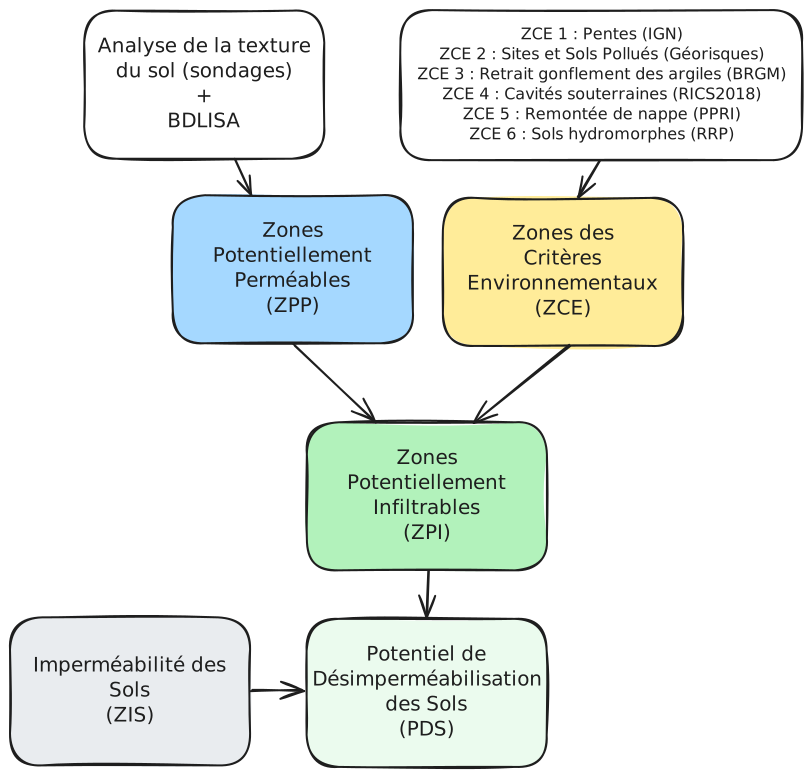
}}Le schéma ci-dessous présente les principales étapes de détermination du potentiel de désimperméabilisation. Pour en savoir plus veuillez consulter les pages résultats et méthodologie.
Incliner et faire tourner la carte
Maintenez enfoncé le bouton droit de la souris et déplacez la pour incliner le point de vue ou faire tourner la carte.
